How to read this article. Pi changes quickly, so claims carry labels:
- Documented: stated in official docs, source code, or the authors’ posts, linked next to the claim.
- Observed: something I experienced first-hand. Not a controlled test.
- Opinion: my interpretation.
- Proposal: an idea worth evaluating. Not something I’ve tested or Pi ships.
Versions. Pi claims refer to @earendil-works/pi-coding-agent 1.3.0 (the npm latest tag when I checked on October 20, 2026), the Pi docs and repository, and the docs of Claude Code and OpenAI Codex (plus Codex’s open-source repository, commit e18a20d) on that date. All of these change quickly, so treat version-specific details as a snapshot. I don’t benchmark output quality anywhere, and nothing here says which agent writes better code.
1. The first surprise
Observed Using Pi felt like having access to some of the most powerful technology available, then finding myself rebuilding things that seemed almost primitive by comparison. The model was strong. The environment around it was thin, next to the integrated coding products I’d used before.
That contrast is a statement about where the work sits, not about quality. In an integrated product, many supporting capabilities already exist when you open it. With Pi, I could change or build those pieces myself, and I started doing that.
This article follows one argument. Pi gives developers more freedom to shape the system around a model, and that freedom transfers responsibility to them. Convenience doesn’t disappear. It becomes something you build, integrate, test and maintain. I’ll go from the architecture and its tool system, through my experiments, to what happens when execution fails, the permission boundary, the workflow problem and Code Mode, then ask whether a bigger toolset would have fixed any of it, and end on what I think the trade-off is.
2. What Pi is
Documented Pi was introduced by Mario Zechner in What I learned building an opinionated and minimal coding agent (November 2025). The code now lives at earendil-works/pi. The agent loop adds your message to the active branch, streams the model’s response, executes tool calls, records results, and starts another turn if needed. Five interfaces share the same agent and session mechanisms: interactive terminal, print, JSON (JSONL events), RPC (JSONL on stdin/stdout), and an in-process TypeScript SDK. (How Pi works)
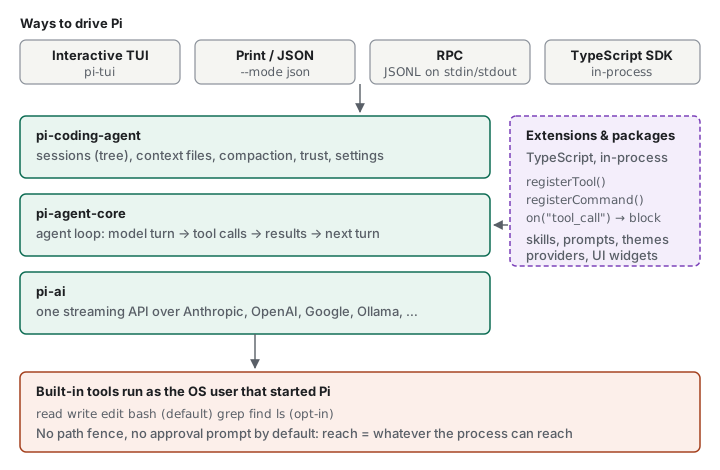
Four built-in tools are on by default: read, bash, edit and write. Four more built-ins (grep, find, ls and the Windows-only powershell) are opt-in (CLI reference). Section 3 covers the whole tool system. The homepage lists what Pi deliberately leaves out: “No sub-agents”, “No plan mode”, “No permission popups”. For each it points to extensions, packages, or other tools instead (pi.dev).
The loop itself is small. Pi appends your message to the active branch, builds a request from the system prompt, the branch, the tool definitions and the model settings, streams the reply, runs every tool call in it, and records the results. If those results or queued messages need another request, a new turn starts. Otherwise the run ends (How Pi works).
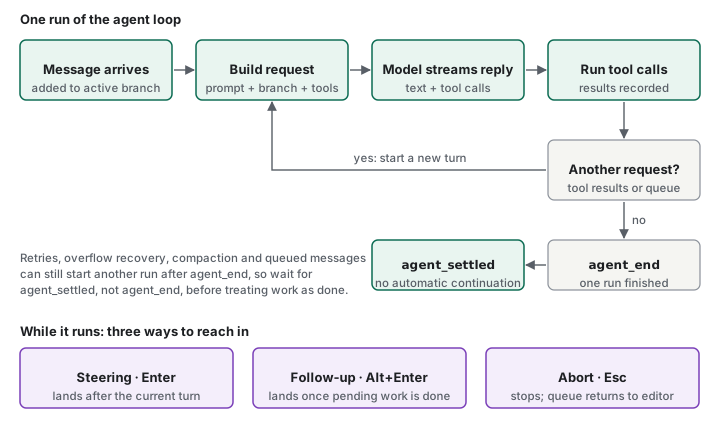
Documented You can reach into a run while it is going. Enter sends a message that guides the next response and waits until the current response and its tool calls finish. Alt+Enter queues a follow-up that runs after the current task. Escape stops the task and returns queued messages to the editor (Usage). Over RPC the same ideas are the steer, follow_up and abort commands. The RPC page also separates two signals: agent_end ends one low-level run, while agent_settled says Pi won’t continue automatically (RPC).
Opinion Steering is the first piece of “control” that section 5 returns to, and it is control for a person at the keyboard. It says nothing about how a parent agent would steer a sub-agent. The agent_end / agent_settled split matters for the same reason recovery does in section 6: “the run ended” and “nothing more will happen” are different statements.
The docs separate the customization mechanisms, and the difference matters for everything below (How Pi works):
| Mechanism | What it is | Enforcement |
|---|---|---|
| Skills and context files | Instructions the model reads, loaded on demand or at start | None. The model may ignore them. |
| Prompt templates | Reusable message text expanded from your input | None. |
| Extensions | TypeScript modules loaded into the Pi process. They register tools, commands, providers, event handlers and UI. | Code. They can block tool calls, and run with the process’s OS permissions. |
| Packages | A way to distribute extensions, skills, templates and themes through npm or git | Same as their contents. |
The homepage says MCP is now built in, together with Codemode (section 10).
These layers answer different questions, and picking the wrong one is the easy mistake. Before writing code, ask what the requirement actually is:
- Instructions or reusable knowledge (how this repo builds, which conventions apply): a context file, a skill, or a prompt template. A skill fits when a workflow “needs more context than a prompt template but does not need a new executable integration point” (Skills).
- Runtime behavior or tool execution (block a call, add a tool, change what the model sees): an extension.
- Integration with other systems: an extension, MCP, or driving Pi from outside through RPC or the SDK (section 9).
- Distribution and upkeep of a set of these: a package. Packages are only a delivery mechanism, and they “can execute extension code and can include skills that instruct the model to run programs”, so reviewing their source is on you (Packages).
Opinion Reaching for an extension when a skill would do means owning TypeScript that has to track Pi’s API. Reaching for a skill when you need enforcement means relying on a model that may ignore it. I haven’t described a case where I chose wrongly, and I won’t invent one. The point is that the extension API is powerful enough that the choice is easy to skip.
Opinion The question that follows is whether Pi is a complete coding application or an agent foundation you build on. I read it as the second. My experiments are what pushed me there.
3. Tools: what the model can actually do
I’ve used the word “tool” throughout, and the rest of the article leans on it. Permissions, observability, sub-agents and recovery are all, underneath, questions about tool calls. So it’s worth being exact about what a tool is in Pi before going further.
Documented In Pi’s extension guide, a tool “defines a name, model-facing description, TypeBox parameter schema, and execute() function” (extensions guide). Pi’s built-in tools have the same shape: each file under src/core/tools defines a description, a TypeBox schema and an implementation. The model never touches your file system. It emits a structured request, and Pi’s code does the work.
One tool call, step by step
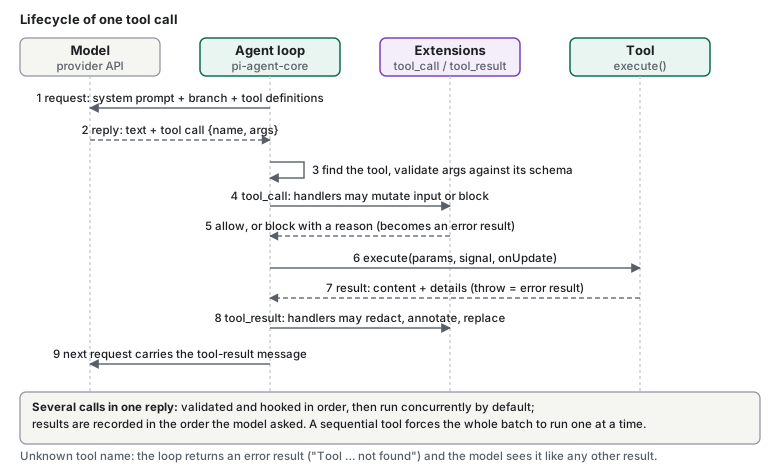
The five parts of the picture have different jobs:
- The model proposes. It sees tool definitions and decides whether to call one. It cannot run anything.
- The agent loop owns execution. It looks the tool up, validates the arguments, runs the hooks, calls
execute()and turns the outcome into a message. - The tool definition is the contract the model reads: name, description and parameter schema.
- The tool’s
execute()is ordinary code running in the Pi process, with that process’s OS permissions. - The tool result goes back into the active branch as a tool-result message, so the next request contains it. That is also the reason big outputs matter: whatever the result holds becomes context.
Documented Pi’s docs say each request is built from the system prompt, the active branch, “available tools” and model settings, and that Pi executes each tool call in a provider response and records the results (How Pi works). The loop code adds the details in the figure: an unknown tool name returns an error result, a blocked call returns an error result carrying the handler’s reason, and calls in one reply run concurrently by default unless toolExecution or a tool’s executionMode says sequential (agent-loop.ts, agent README). From the extensions guide: tool_call handlers “can mutate input or block execution”, and tool_result handlers can redact, annotate or replace results.
What ships with Pi
Documented The CLI reference lists eight built-in tools, and the source’s allToolNames set has the same eight. The docs never state a total, so “eight” is my count of that table. Four are enabled by default (read, bash, edit, write), controlled by the defaultTools setting (Settings). The output limits in the last column come from the tool source at the repository’s main branch (commit a731ba8, package version 1.3.0), not from the prose docs.
| Tool | Responsibility | Default | Output limit (from source) |
|---|---|---|---|
read |
Read text files and supported images | on | 2,000 lines or 50 KB, with offset / limit to continue |
bash |
Run a shell command in the working directory | on | Last 2,000 lines or 50 KB; full output saved to a temp file |
edit |
Apply exact text replacements to an existing file | on | n/a |
write |
Create or overwrite a file | on | n/a |
grep |
Search file contents; respects .gitignore |
opt-in | 100 matches or 50 KB |
find |
Find paths by glob pattern; respects .gitignore |
opt-in | 1,000 results or 50 KB |
ls |
List a directory, dotfiles included | opt-in | 500 entries or 50 KB |
powershell |
Run PowerShell commands, Windows only | opt-in | like bash |
Two more tools come from Pi’s built-in extensions, not from the core tool set. Both are off by default (CLI reference):
| Tool | Responsibility |
|---|---|
codemode |
The model writes JavaScript that calls other tools; only the script’s output comes back (section 10) |
tool_search |
Finds tools that aren’t declared to the model and declares the matches for the next call |
Documented The docs say the MCP extension turns these two on “when an MCP server needs them”, and that you can name them in --tools or defaultTools yourself. --tools replaces the whole selection, while +name / -name entries adjust the default one: pi --tools +codemode,-write (CLI reference).
A correction to my own earlier shorthand: section 2 says four tools are on by default and grep, find and ls are opt-in. That’s true but incomplete. There are eight built-in names including a Windows-only shell, and two more tools sit behind extensions.
Core tools, extension tools, and your own
The question “how many tools does Pi have?” has no single answer, because tools reach the model in different ways:
| Kind | Defined by | How it reaches the model |
|---|---|---|
| Built-in tools | Pi’s core (read, bash, edit, write, grep, find, ls, powershell) |
Declared when active; the first four are active by default |
| Built-in extension tools | Pi’s bundled extensions (codemode, tool_search) |
Registered inactive; activated by name or by the MCP extension |
| MCP tools | An MCP server you configure; named mcp__<server>__<tool> |
Per-server exposure: codemode (default, not declared to the model), deferred, direct or hidden (MCP) |
| Custom extension tools | Your TypeScript extension, through pi.registerTool() |
direct by default, activated on registration; other exposures are available |
| SDK tools | The host application embedding Pi, through the customTools option |
Part of the active tool set that tools, noTools and excludeTools control (SDK) |
A custom tool is a small piece of code. This is Pi’s own hello.ts example, abridged (source):
const helloTool = defineTool({
  name: "hello",
  label: "Hello",
  description: "A simple greeting tool",
  parameters: Type.Object({ name: Type.String({ description: "Name to greet" }) }),
  async execute(_toolCallId, params, _signal, _onUpdate, _ctx) {
    return {
      content: [{ type: "text", text: `Hello, ${params.name}!` }],
      details: { greeted: params.name },
    };
  },
});

export default function (pi: ExtensionAPI) {
  pi.registerTool(helloTool);
}
Documented What the docs and source say about writing tools: throw from execute() to report a failure, because returning an error-shaped object doesn’t mark the result as an error. Truncate large results and tell the model where the full output is. File-mutating tools should wrap their read-modify-write in withFileMutationQueue(), and tools that share mutable state should run sequentially. A tool can declare an outputSchema so codemode scripts get structured data while the model still gets text. A tool without a promptSnippet is omitted from the “Available tools” list in the default system prompt, according to the type definition’s comments. An extension can also register a tool with a built-in’s name to replace it. The repo’s tool-override.ts example does that to read, to log file access and block sensitive paths. I haven’t run it. (extensions guide, types.ts)
Tool, extension, skill, MCP server, package
Section 2 separated the customization mechanisms by what they enforce. Here is the same split by what each one does to the model’s tool surface:
| Mechanism | Adds a model-callable operation? | Runs code in the Pi process? |
|---|---|---|
| Tool | Yes, it is the operation | Yes, its execute() |
| Extension | Yes, if it calls registerTool(). It can also add commands, hooks, providers and UI |
Yes |
| Skill | No. The model follows its instructions with tools it already has | No |
| Prompt template | No. It expands into message text | No |
| MCP server | Yes, its tools show up as mcp__<server>__<tool> |
The server is a separate process or remote service. Pi’s MCP extension is the client |
| Package | It carries any of the above | Whatever it contains |
Documented Pi’s quickstart gives the rule of thumb: “Start with the least powerful mechanism that meets your need”. Its table maps persistent folder instructions to AGENTS.md, task-specific instructions to a skill, and “executable tools, commands, or event handlers” to an extension (Quickstart).
Documented Constraints that matter for custom tools. Extensions “run inside the Pi process with the same operating-system permissions” and can read prompts, tool calls, files, credentials and session history, so the guide says to load them only from trusted sources (extensions guide). Enabled tools use the OS permissions of the Pi process, and Pi “does not ask for approval before every tool call” (Security). Project-local extensions and .pi/mcp.json load only after project trust is granted, but trust “does not limit what tool calls can access or affect”.
Opinion Two consequences follow. First, a custom tool is a new capability that has to be designed: a good description and schema, bounded output, honest errors and a decision about what it may touch. Nothing in Pi does that review for you. Second, a tool_call hook can refuse calls, but Pi’s own security page puts the real boundary at the operating system, not at the hook. Read in this light, my experiments in section 4 were attempts to build behavior at this layer. That’s an interpretation. I’m not reporting which hooks or tools each experiment used.
4. Building the missing pieces
Observed I experimented with extensions to get capabilities I didn’t find in the form I wanted:
- an orchestrator,
- sub-agents, for work with long sessions or a lot of context,
- extensions intended to restrict permissions,
- an attempt to run Pi inside a Docker container as a sandbox.
These ran into implementation difficulties and errors. Even so, they taught me more about how an agent works internally. The difficulty I can describe most precisely was watching what the sub-agents were doing, which section 5 takes apart. I don’t itemize the individual errors here. I also don’t report a configuration or results for the Docker attempt, so nothing in this article treats it as a test of Pi’s security.
The sequence matters more than any one error. The motivation for the sub-agents was long sessions and large contexts. I didn’t find what I wanted in the form I wanted, so I tried building it. Beyond the effort, what that left me with were questions about delegation: what an orchestrator is responsible for, where a sub-agent’s results and failures go, and who can see them. The rest of this article follows those questions. That is my reading of my own experiment. It’s an interpretation of what happened when I built these pieces, not a claim that Pi lacks delegation capabilities in general.
What the documentation sets up is a separate, checkable matter. Pi names “no sub-agents” as a choice. Its extension guide doesn’t mention sub-agents either, though it does let an extension run other tools with ctx.executeTool(), and those nested calls pass through the same tool_call handlers as model-issued ones (extensions guide). So an orchestrator isn’t something you configure. It’s something you design.
Context is more than a window
Start with what fills the window at all. The system prompt is Pi’s base instructions plus the context files it finds. Tool definitions go out with every request, and the active branch is converted into user, assistant and tool-result messages. Skills load progressively: only each skill’s name, description and path go into the system prompt, and the full SKILL.md is read when the model decides a task matches the description. A skill with disable-model-invocation: true is available only through its explicit /skill:name command. Your own message can carry @ file references, pasted images and !command output (!!command runs a command without sending the output to the model), and extensions can add instructions or transform the context before the request leaves (How Pi works, Skills, Usage, extensions guide).
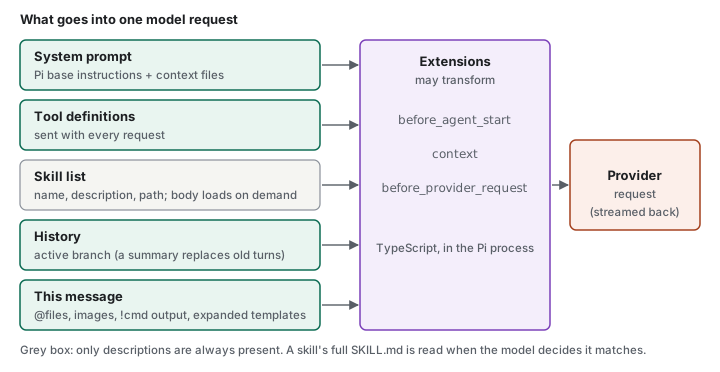
Opinion Two consequences. A skill’s description is its routing signal, so a vague one routes badly, which the Skills page says too. And because descriptions are always in the prompt, a large skill collection has a standing cost on every request. I haven’t measured that cost, so I treat it as a design consideration and not a number.
Documented Sessions are saved automatically (unless --no-session) under ~/.pi/agent/sessions/, grouped by working directory. “Pi stores entries as a tree, so returning to an earlier point does not erase the branch you leave.” /tree moves within the current session file, /fork creates a new session from an earlier user message, and /clone copies the active branch into a new one. The model receives only the active branch, not every branch in the file (Sessions). Compaction “does not delete the original session entries” (Sessions). A summary entry stands in for older messages in later requests, and the originals stay in the tree (How Pi works).
- Compaction manages what the model sees now. It replaces older messages with a summary, so what the summary keeps decides what the agent knows afterwards.
- Persistence keeps the full record on disk, including what compaction hid from the model.
- Branching controls direction: you can go back to an earlier point and try another approach without losing the one you left.
Documented Auto-compaction starts when the context token count exceeds the window minus reserveTokens (default 16,384). Pi walks backward until it has about keepRecentTokens (default 20,000) of recent messages, keeps those verbatim, and sends everything older to the model for a summary, passing in the previous summary if there is one. The result is stored as a compaction entry with a firstKeptEntryId. A cut never lands on a tool result, which must stay paired with its call, and if one user turn is too large Pi cuts inside it and merges two summaries. Summaries follow a fixed outline (Goal, Constraints & Preferences, Progress, Key Decisions, Next Steps, Critical Context) plus lists of files read and modified. /compact [instructions] steers what a manual summary emphasizes, compaction.modelOverrides sets values per model, and the session_before_compact extension event can cancel compaction or supply your own summary. When /tree moves you to another branch, Pi can also summarize the branch you left. (Compaction)
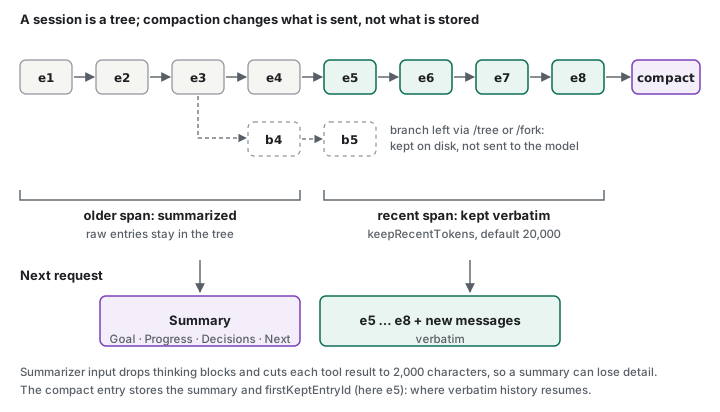
Opinion So context management isn’t only about fitting more into a window. It’s also about choosing which history the agent carries forward and which path it takes next. But none of this is shown to solve exhaustion by itself. Compaction can fail (the docs say to fix the provider problem and run /compact again), a summary is lossy by nature, and the on-disk record doesn’t re-enter the model’s context on its own. Branching helps a person steer; it doesn’t make a long task continue by itself. I haven’t tested how these features behave under my orchestrator experiments, so I can’t say whether they’d have removed the need for sub-agents.
Opinion The documented numbers show where detail can disappear. Before summarizing, Pi serializes messages as labeled text, drops thinking blocks, and cuts each tool result to 2,000 characters (Compaction). A long test log or file listing reaches the summarizer truncated. That is my inference from the documented limits. I haven’t compared a real summary with its source.
5. When delegation becomes hard to see
Observed While experimenting with sub-agents, I found it hard to watch what they were doing. The main agent could keep reporting that work was in progress, while I had little or no clear view of what a sub-agent was actually doing.
The observation is about a gap: a general progress signal versus the ability to inspect real execution. It’s easy to build the first and skip the second. I’m not claiming my extension had or lacked any particular mechanism. The point below is what a delegating system needs, if you want to trust it.
Opinion Launching a sub-agent is only orchestration. Understanding it takes more:
- Status versus progress. “Running” says a task exists. It doesn’t say whether it’s reading files, waiting on a model, or stuck.
- Execution events. The tool calls and intermediate results of the child, not only its final answer.
- Tracing across levels. A way to connect a child’s actions to the parent request that caused them.
- Failure handling. Timeouts, stalled tasks, and an error path that reaches the parent as something other than silence.
Pi’s building blocks cover part of this. Sessions are stored as JSONL trees recording messages, tool calls and results, and compactions, and JSON and RPC modes stream agent events (How Pi works). The extension API adds finer-grained hooks. Lifecycle events include agent_start, turn_start, message_update and agent_settled, and tool execution has tool_execution_start, tool_execution_update (progress during a call) and tool_execution_end. For nested calls made through ctx.executeTool(), these events carry a parentToolCallId (extensions guide). The SDK exposes session.subscribe() for events of one in-process session (SDK). These are building blocks, and I haven’t verified how they behave across separate child Pi processes. The docs I read describe no dashboard, metrics or tracing system beyond them. Whether a child process appears in that record usefully depends on how you launch it. That’s a design decision you own.
The extension API is where those building blocks get specific. The figure lists the hooks in the order they fire and what each can do: some only observe, some transform what passes through, and a few can block.
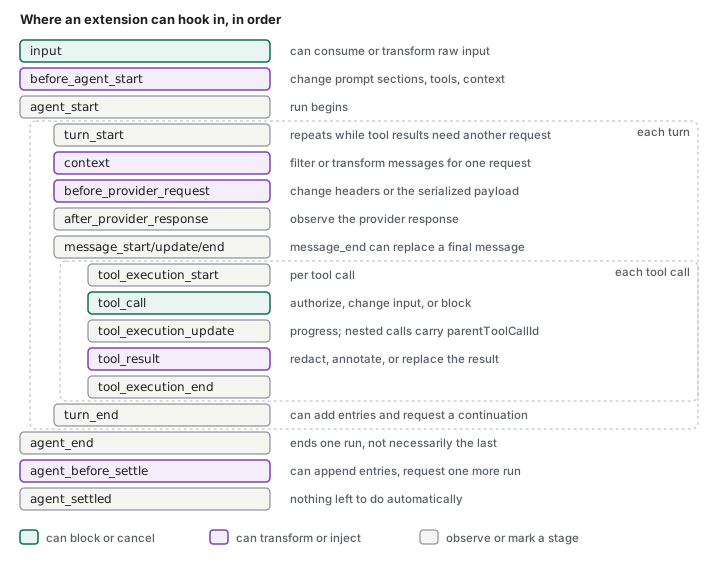
Documented tool_call can authorize, change or block a call, and a handler that throws blocks it. tool_result can redact, annotate or replace the result. turn_end and agent_before_settle can append entries and ask for a continuation, and the docs say to guard against loops. provider_stream_event is notification-only and awaited in stream order, so a slow handler delays the stream. pi.events lets extensions message each other, and pi.appendEntry() stores data in the session without sending it to the model. The examples directory includes debug-provider.ts, an opt-in viewer for raw provider stream events. (extensions guide)
Opinion This is the most concrete support I found for the argument of this section. The seams for watching an agent exist, down to individual tool calls and provider events. What the docs don’t describe is a finished view built from them. So the question isn’t whether Pi can be observed. It’s who builds the view.
Put together, three properties are separate, and an agent can have the first without the others:
- Execution: it can perform actions.
- Observability: you can tell what it is doing and where it is.
- Control: you can intervene, change approach, or stop it.
Delegation without observability creates a system that can act without being easy to understand. That’s a conclusion about the design, not a claim that every multi-agent system works this way.
Control has a documented side too. A person can steer, queue a follow-up or abort (section 2), and a program can do the same over RPC. Those act on a Pi session. How a parent agent would apply them to a child, when it should, and what the child does with them are decisions I would have to design. I’m not claiming Pi can’t do it.
6. When execution stops
Observed During normal use I ran into unexpected failures: model response errors, incorrect tool usage, and context window exhaustion. In some cases, execution stopped without automatically recovering in a way that let the task continue. I had to step in, diagnose the problem, adjust the execution state or my approach, and find a way to resume. Some failures I could resolve that way, and the task went on after a minor interruption. Others stopped the task from progressing at all.
That gives two groups, and the difference between them is the useful part: interruptions I could recover from by diagnosing and resuming, and failures that blocked the task. I’m not assigning particular failures (a response error, a tool misuse, context exhaustion) to either group, and I’m not saying any of them is unrecoverable in general. Whether a failure resumes depends on the model, the provider, the configuration and any extensions, and my account doesn’t map one to the other.
This is a different problem from the one in section 5. Observability asks whether you can see what an agent is doing. Recovery asks what happens when what it’s doing breaks. An agent’s ability to execute a task and its ability to recover when execution fails are separate properties. A system can be very good at the first and say little about the second.
I shouldn’t overstate what Pi lacks, because it does have recovery behavior, and the docs describe it:
Documented Pi has automatic agent-level retry for “transient failures”, enabled by default, with a default of 3 attempts and exponential backoff starting at 2 seconds and capped at 60 seconds (Settings). It also has automatic compaction, which starts when free context drops below a reserve (16,384 tokens by default). On a provider overflow or length error, Pi runs a recovery compaction and then starts the retry as a fresh run. If that recovery compaction fails or is cancelled, Pi “schedules no internal retry” (Compaction). When a tool itself fails, the failure becomes an error result for the model (extensions guide).
So the accurate statement isn’t that Pi never recovers. Some failures have a built-in path, and some paths are bounded: three retries by default, and a compaction recovery that ends without a retry if compaction itself fails. The docs I read don’t list which errors count as transient. They also don’t describe built-in handling for a model that keeps using a tool incorrectly, or for a run that ends in a state you want to resume. I don’t know whether any of my failures fell inside or outside the built-in paths. I’m not claiming they were gaps in Pi. They may have been cases where the defaults were exhausted or didn’t apply.
The figure draws those paths and what happens when each one runs out. Solid boxes are documented behavior. The dashed row marks a gap in what I read, not a claim about Pi.
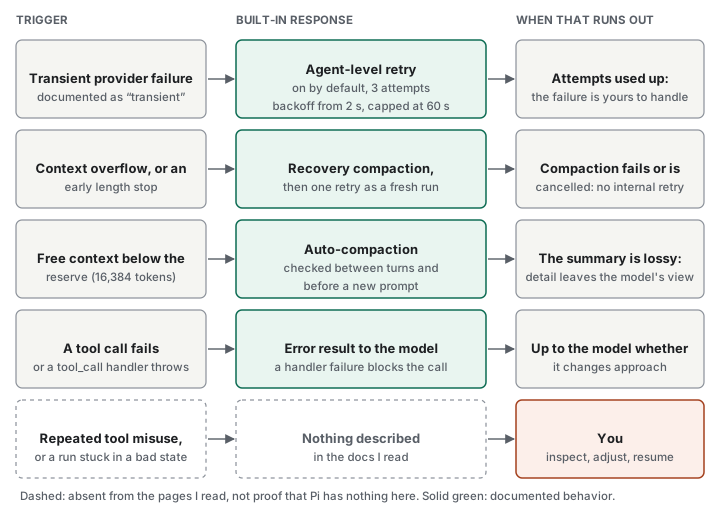
Opinion Whether a particular failure resumes by itself is less important than who decides what “recovered” means. Reliable recovery tends to need decisions about:
- Retry strategy. Which errors to retry, how often, and when to stop retrying and escalate.
- Error handling. Whether a bad tool call becomes a message to the model, a stop, or a request for you.
- Context management. What gets summarized or dropped when the window fills, and whether the task survives it. Compaction summarizes earlier work, so what the summary keeps shapes what the agent knows afterwards.
- Explicit recovery workflows. A defined way to inspect the failed state, adjust it and resume, rather than improvising each time.
Documented The pieces for building that last row from outside are documented too. Over RPC, a controlling program can switch auto-retry and auto-compaction on or off (set_auto_retry, set_auto_compaction), abort a retry in progress (abort_retry), compact on demand (compact), and watch compaction_start, compaction_end and the summarization_retry_* events. Inside the process, session_before_compact can replace Pi’s summary, and session_compact_failed fires when compaction fails or is aborted. (RPC, Compaction)
Proposal A small supervisor over RPC: let the built-in retry run, watch the compaction and retry events, and when a run settles in a failed state, apply a policy I wrote, such as compacting with explicit instructions, switching model, or handing the task back to me. I haven’t built or tested this.
Pi gives you parts of this, and its session tree, which keeps the original entries even after compaction, is a useful record to resume from (How Pi works). I haven’t looked for packages that add retry or safer compaction, so I can’t say whether they exist or how well they work. In an integrated product, more of these decisions may already be made for you. With Pi, defaults are a starting point, and the rest is yours to design, test and maintain. That’s the same trade-off as before, seen from the failure case: freedom to customize an agent doesn’t come with a guarantee that it recovers gracefully.
7. The real permission boundary
The permission-restricting extensions and the Docker attempt from section 4 raised the question of what actually limits an agent. A prompt, a restricted tool and a container are different things, so it helps to separate them.
The loop is conceptual, not a diagram of Pi’s internals:
context → model → tool request → runtime → execution environment → tool result → updated context
Five layers can each be called “permission”:
- Process permissions. What the OS user running the agent can do. Anything inside the process is bounded by this.
- Application-level checks. Rules in the agent that inspect a tool call and allow, ask or deny it.
- Project-directory boundary. Whether the working directory is a fence or only a starting point.
- Tool capabilities. A structured
readcan be fenced by path. A shell can run any program, which can open any file. - Isolation. Containers, VMs and OS sandboxes restrict the process itself, including its children.
Documented Pi’s security page says Pi “can read, change, and execute files with the permissions of the account that started it” and “does not ask for approval before every tool call”. The working folder controls resource discovery and the default tool location, but it doesn’t limit commands from reaching other paths. Watching the transcript, trusting a project and reviewing changes are not security boundaries. The recommended option is running Pi entirely inside a container, VM or sandbox, with narrow, short-lived credentials and restricted network where possible.
Documented In the source, read.ts accepts relative or absolute paths and checks only that the file is readable. The path helpers it calls (path-utils.ts and utils/paths.ts) keep an absolute path as it is and join a relative one to the working directory. Neither compares the result to the working directory. I read this code on the main branch, whose package version is 1.3.0, but I haven’t run Pi’s tools, and I haven’t traced every route a file can be read by. Don’t treat it as a tested result.
That fits the documentation: by default there’s no application-level fence. But the absence of a prompt doesn’t prove unrestricted access in every setup. An extension can add checks. The tool_call event can mutate or block a call, and a handler that throws blocks it fail-closed (extensions guide). A prompt doesn’t prove comprehensive security either. Claude Code’s docs say its Read and Edit deny rules apply to its built-in file tools, to file commands it recognizes in Bash such as cat, and to redirection targets. They don’t apply to a command that reads files without naming them, such as grep -r pattern ., or to a script that opens files itself. For OS-level enforcement the docs point to its sandbox, and they say bypassPermissions mode should only be used in isolated environments like containers or VMs (permissions). So both sets of docs point to isolation for the real boundary. They differ in the default between you and it. In Claude Code’s Manual mode (the config value default), it asks before most actions that edit files, run shell commands or reach the network (permission modes). A built-in set of read-only commands such as cat and ls runs without a prompt, including on paths outside the working directory, unless permissions.blockReadsOutsideWorkingDirectories is turned on. The docs also say that from v2.1.283, auto mode is the starting mode for interactive terminal and VS Code sessions, with a classifier reviewing actions instead of you. Pi asks for nothing. I compared documentation, not behavior: I haven’t run Claude Code for this article.
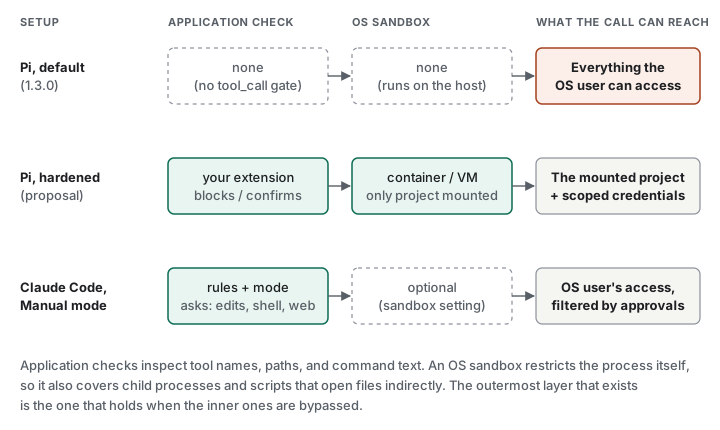
Two Pi-specific details are easy to miss:
-
Project trust is not a sandbox. It gates what a folder supplies: project settings and MCP servers, extensions, skills, prompt templates and themes under
.pi, system-prompt files, and project-configured packages. It “prevents a folder from silently loading executable extensions before you approve it”, and the security page says it “does not limit what tool calls can access or affect”. Extensions run “inside the Pi process with the same operating-system permissions”, so a trusted extension can read prompts, tool calls, files and session history (extensions guide). Context files (AGENTS.md,CLAUDE.md) load without trust (Configuration). Instructions in a repository you cloned can reach the model whether or not you trusted it. Whether a given model would act on a hostile instruction is a separate question I haven’t tested. -
Docker is a tool, not a guarantee. What a container actually isolates depends on what you mount, which credentials you pass in, whether the network is open, and which user it runs as. A container that mounts your home directory and an API key with broad scope has moved the problem, not solved it. This is general container security, not a result from my attempt (Docker security).
In short, three questions get mixed up. Trust asks whether a folder’s own resources may load. Permissions ask what the running process and its tools can technically do. Isolation asks what stays out of reach even if an agent or extension misbehaves. Pi’s docs provide the first, describe the second, and leave the third to you. I haven’t audited Pi’s security beyond reading these pages and one tool’s source.
What Pi’s containerization guide offers
“Bring the container” would be thin advice on its own, and the docs go further. The containerization guide describes four options, and they differ in what the boundary contains:
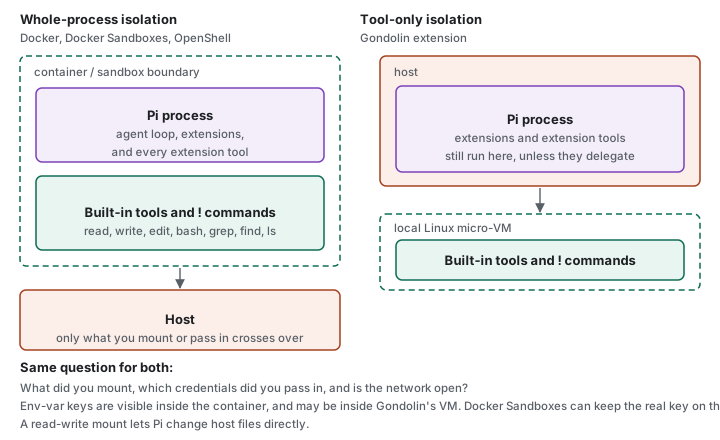
Documented Plain Docker runs the whole Pi process in a container (the guide’s Dockerfile is based on node:24-bookworm-slim), mounts the working folder at /workspace, passes keys with -e, and keeps settings and sessions in a named volume. Docker Sandboxes runs Pi in a managed sandbox where the real credential stays on the host and a proxy substitutes it for requests to the configured host. OpenShell runs Pi in a local or remote sandbox with filesystem, process, network, credential and inference policies. A remote one doesn’t bind-mount your folder, so you transfer files explicitly. Gondolin is an extension that runs Pi on the host but routes the built-in tools and ! commands into a local Linux micro-VM. Other extension tools still run on the host unless they delegate. The guide warns against mounting ~/.pi/agent (credentials, settings, extensions, sessions) unless that access is intended, notes that environment variables passed into a container are visible inside it, and says Gondolin’s commands inherit the host environment, so keys set as environment variables may be visible in the VM. It also says to review the Gondolin example before adding tools that could bypass the VM boundary. (Containerization)
Opinion This makes the permission story concrete, and it sharpens the choice. Whole-process isolation also contains the extensions I load, which matters because my own experiments were extensions. Tool-only isolation fences the built-in tools but leaves my extension’s code, and any tool it registers, on the host. Neither is wrong, since they answer different questions. The work is real either way: pick one, mount narrowly, scope credentials, and keep the setup working as Pi and your extensions change. That is why the proposal below leans toward whole-process isolation.
Proposal If I used Pi on real work, I’d start with the container documented as the strongest option, mount only the project, and pass a scoped key. I’d add a tool_call extension for visibility and catching mistakes, not as the wall. I haven’t tested this setup.
8. From agent to workflow
Once I looked at using Pi in projects that already used AI-assisted development, a different problem appeared. Capability isn’t workflow. A capable agent doesn’t know how a project builds, which conventions it follows, which tests must pass, or when work counts as done.
The rest of this section is analysis of what fitting an agent into a project costs. It is general reasoning, not a report of something that went wrong in a particular project of mine.
Opinion Capabilities say what the agent can do. Workflow says how work proceeds, under which constraints, and how completion is checked. Fitting an agent into an existing project raises questions like:
- Context. Where do project rules live? Pi loads
AGENTS.mdandCLAUDE.mdas context files, so existing instructions can carry over. Instructions still aren’t enforcement. - Tools. Existing scripts work through
bash. That’s cheap, but the model has to learn them from a README or--help. - Coordination. If other AI-assisted processes touch the same repository, who decides what runs when?
- Validation. Who ensures tests and reviews actually run? Instructions are advisory. An extension or an external harness (RPC, JSON mode, SDK) is where checks can be enforced.
- Handoff. How does the agent say it’s finished, and how does the next person or process know?
This is where the earlier sections meet. Observability, recovery and the permission boundary are workflow questions at heart: what does the system do, can anyone see it, and what constrains it. An integrated product has made many of those decisions already. With Pi, you make them.
9. No built-in WebUI doesn’t mean no integration options
Pi has no integrated web interface, which I felt as a gap. But a missing UI and missing interfaces are different things. The docs list several ways to drive the same agent (CLI, How Pi works):
| Interface | Intended use |
|---|---|
| Interactive (default) | Terminal UI for a person. |
Print (-p) |
One prompt, final text to stdout, then exit. |
JSON (--mode json) |
One-shot run that writes agent events as JSONL. |
RPC (--mode rpc) |
Long-running process driven by JSONL commands on stdin, events on stdout. |
| SDK | TypeScript library creating and controlling sessions in-process. |
So a web front end isn’t blocked. You could build one over RPC or the SDK. What the interfaces don’t do is the work around them: rendering the UI, handling streamed output, keeping session state, deciding what happens on errors (section 6), and managing the agent’s lifecycle. The SDK page even names a subtlety you’d have to handle: agent_end marks the end of one run, while agent_settled signals that Pi won’t continue automatically. I haven’t built such a front end, so this describes the documented surface and not my experience.
The details are where the work hides (RPC). The figure shows the shape of one prompt over the RPC interface, and the part a naive client gets wrong.
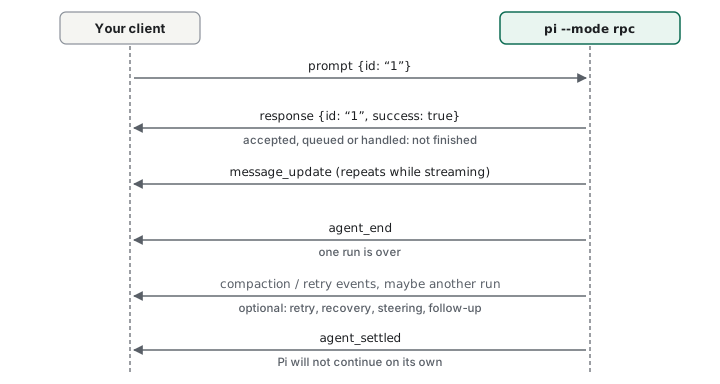
Documented Records are JSON objects terminated by LF, and clients should split only on LF: the docs warn that Node.js readline also splits on U+2028 and U+2029, which can appear inside JSON strings. Stdout carries only protocol records, and diagnostics go to stderr. Commands take an optional id that the response repeats, and responses can arrive out of order. A successful prompt response means the prompt was accepted, queued or handled, not that the work finished. If data.disposition is "handled", no run starts and agent_settled won’t follow. Clients should subscribe before sending the prompt, and closing stdin requests an orderly exit. The command set covers sessions (fork, clone, get_tree, export_html), models (set_model, set_thinking_level) and compact, so a front end could offer much of what the TUI does. Extension dialogs and notifications are forwarded over RPC, but custom components aren’t. (RPC, extensions guide)
Opinion A client that treats the first response as completion, or reads lines with a generic reader, can work in a demo and misbehave later. None of this is hard, but it is the kind of detail a missing WebUI hands to you.
Opinion The missing WebUI is a small version of the whole trade-off. The ready-made experience isn’t there, and a custom one is possible, but whoever builds it owns it. I don’t claim the omission was a philosophical choice. The docs I read don’t say.
10. Code Mode: a design direction I haven’t tried
I found Pi’s Code Mode in the docs. I haven’t used it on a real task, so this section describes the documented design and nothing about results.
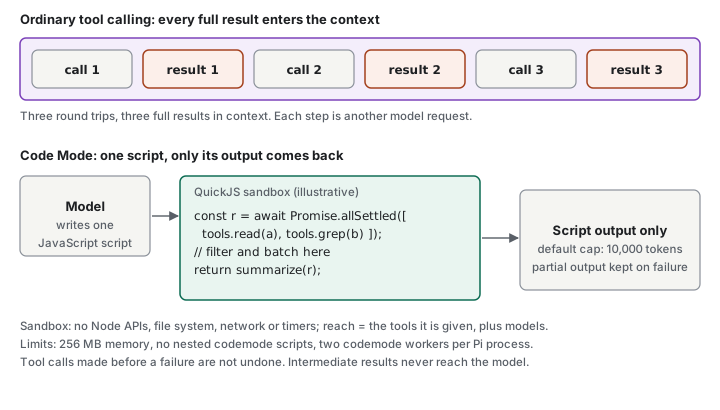
Documented Code Mode lets the model write a JavaScript script that calls Pi’s other tools. The script runs in a QuickJS sandbox, and “only the script’s output reaches the model”, so a script can batch calls and filter large results before anything enters the context. Each tool is a method on tools, MCP tools are callable the same way, and failed calls reject so Promise.allSettled() can keep partial results. The sandbox has no Node APIs, file system, network or timers: “scripts reach the outside world only through tools and models”. Documented limits include a default output cap of 10,000 tokens, a 256 MB memory limit, no nested codemode scripts, and at most two codemode workers alive in one Pi process. A failed script keeps its partial output, and tool calls made before the failure aren’t undone. (Code Mode docs)
Documented Extensions decide what Code Mode can see. A tool’s exposure can be direct (the default), model-only, codemode, deferred or hidden, and tools can declare a namespace and MCP-style annotations. Extensions can also register MCP servers with pi.registerMcpServer(). (extensions guide) I haven’t traced exactly what each exposure value does, so I list them as the documented knobs and nothing more.
Documented Earendil’s post You Said No MCP! (September 29, 2026) says MCP is now part of Pi’s core, that Codemode runs on the harness side, and that it is loaded automatically when MCP is configured. The post acknowledges that pi.dev and earlier posts had declared Pi did not support MCP. Mario Zechner’s November 2025 post said Pi “does not and will not support MCP”. On why tools needed new metadata for Codemode, the post says they “did not yet upgrade our tool loadout to better scale to these new capabilities” (it names deferred tool loading and similar model features).
Opinion Code Mode and multi-agent orchestration solve different problems. Code Mode composes tool calls inside one agent turn, so intermediate results don’t cost context or round trips. Orchestration splits work across agents, each with its own model interaction. Code Mode doesn’t replace the orchestrator I tried to build, and I can’t say it would have helped. What I find interesting is that the sandbox is explicit: the script’s reach is exactly the tools it’s given. The trade-off from section 5 still applies. A script that batches many calls into one output is efficient, and also a place where intermediate activity is hidden from the model.
I’d like to try it on a real task before judging it. Until then it stays a hypothesis.
11. More tools, a better agent?
My first reaction to Pi’s thin environment (section 1) was to count what was missing. The tool system makes that reaction worth examining, because it’s tempting to turn “fewer built-in tools” into “less capable”. I don’t think tool count settles anything, and the comparison below is meant to show why.
What the three harnesses ship
Documented Everything in the table comes from official docs or the projects’ open-source trees, checked on October 20, 2026. Claude Code’s table is from its tools reference. Codex’s cells combine its customization, MCP and approvals docs with the tool handlers in the openai/codex source (commit e18a20d). I found no official Codex page that lists its tools or gives a count, so I don’t give one.
| Pi | Claude Code | Codex | |
|---|---|---|---|
| Built-in tool surface | 8 core tools (4 on by default), plus 2 off-by-default extension tools | The tools reference lists 46 entries. Several are conditional: task tools depend on the model, Grep and Glob are left out by default on macOS, Linux and WSL, and one entry is marked removed |
No documented list or count. The source has handlers for shell execution (exec_command, write_stdin), apply_patch, update_plan, view_image, request_user_input, request_permissions, MCP resource tools, tool_search, multi-agent tools and hosted web search. I didn’t verify which are on for a given model or config |
| File editing | edit (exact replacement), write |
Edit, Write, NotebookEdit |
apply_patch |
| Search | bash, or opt-in grep / find / ls |
Grep / Glob on Windows. Elsewhere, Claude searches with find and grep through Bash by default |
Through the shell tool. I found no dedicated search handler |
| Planning, sub-agents | Not built in; the homepage says “No sub-agents”, “No plan mode” | Agent, EnterPlanMode, AskUserQuestion, task tools, worktree tools and more |
update_plan, request_user_input, multi-agent tools. Docs describe subagents as a customization layer |
| Adding tools | registerTool() in an extension, SDK customTools, MCP |
MCP (“To add custom tools, connect an MCP server”). A skill “runs through the existing Skill tool rather than adding a new tool entry”. Hooks and permission rules constrain tools |
MCP, with enabled_tools / disabled_tools for MCP servers. Skills are instructions; plugins package and distribute them |
| Permissions and sandbox | No approval prompts and no sandbox by default; the docs tell you to bring a container | Allow and deny rules per tool name, permission modes, and a per-tool flag for whether a prompt is required | An OS-enforced sandbox (Seatbelt, bwrap plus seccomp) plus approval policies. In version-controlled folders the default is workspace-write with on-request approval |
| Controls on context cost | --tools allowlists, exposure, tool_search, codemode |
ToolSearch defers MCP tool definitions by default; alwaysLoad opts a server out |
enabled_tools / disabled_tools; a tool_search tool exists in the source |
Opinion Reading the table, I see three different bets, not one big and one small. Pi bets on a few general primitives plus hooks you program yourself. Claude Code bets on a broad, integrated surface with a policy layer (permissions, hooks, plugins) around it. Codex, going by its docs and source, bets on a few strong primitives (shell and patch) inside an OS-level sandbox with approval policies. The vendors don’t state these as design philosophies, so this is my reading of what they ship.
Documented Pi’s author has stated a rationale for the small set: in November 2025 Mario Zechner wrote that “these four tools are all you need for an effective coding agent”, that Pi’s system prompt and tool definitions “come in below 1000 tokens”, and that popular MCP servers “dump their entire tool descriptions into your context on every session”. He described Codex’s tool definitions as “similarly minimal to pi’s” and Claude Code as “a spaceship with 80% of functionality I have no use for” (post). Those are the author’s opinions, from a post that also said Pi would not support MCP. Pi has since changed course on MCP (section 10), and I haven’t verified the 1,000-token figure against the current version.
The argument: a bigger toolset isn’t automatically a better agent
My claim is narrower than “fewer is better”. A larger toolset does not by itself make an agent more capable, reliable or useful, and a smaller one doesn’t by itself make it safer or simpler to live with. Six angles follow, each marked for what kind of claim it is.
1. Simplicity versus capability. Opinion A few general tools can cover the fundamental operations: read, write, edit and run a command. bash alone can already do what grep, find and ls do, which is why those three are opt-in in Pi, and Claude Code’s docs say that on macOS, Linux and WSL it too leaves Grep and Glob out by default and searches through Bash. Overlap is where a bigger set starts to cost: two tools that do nearly the same thing give the model a choice to make and give you two behaviors to understand. But a small set has overlap too (edit and write both change files, and bash can do either), so small is not the same as non-overlapping.
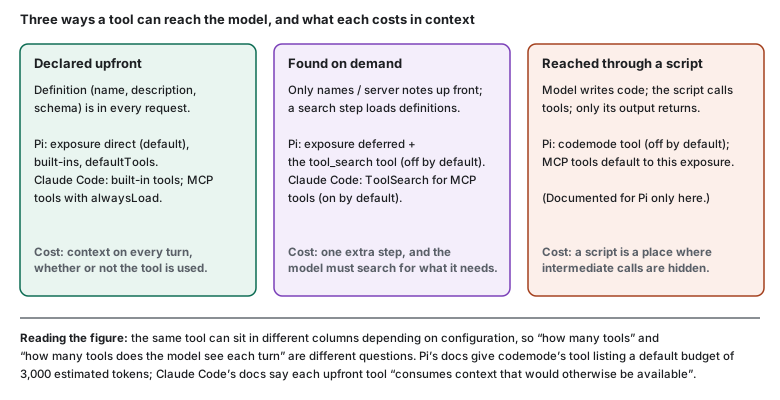
2. Tool selection and reasoning. Opinion The intuition is that every extra tool is another option the model must weigh, which could make selection less predictable. I haven’t measured that, and neither the Pi nor the Claude Code docs I read make a claim about selection accuracy, so I treat it as a hypothesis. What the docs do show is that both products built mechanisms to avoid declaring everything upfront (the figure), which suggests their authors take the cost of a large declared set seriously. That’s an inference about intent, not a stated reason.
3. Extensibility versus built-in completeness. Opinion A minimal core makes fewer assumptions and is easier to read end to end. The matching cost is the one this whole article is about: whatever the core leaves out, someone must build, test and maintain. Pi’s extension API is generous, but a custom tool is code you own, written against an API that has changed (section 12 notes the package rename). An integrated harness has done that work once, for everyone.
4. Control versus convenience. Opinion A small default set is a clear base to customize: you can read what the model is offered, change it, and hook every call. A polished harness gives you something working on the first day. Both are real goods. Which one wins depends on whether you’ll ever use the control, and I’d be dishonest to claim I always did.
5. Context and implementation cost. Documented Tool definitions, schemas and instructions are context. Claude Code’s docs say “each upfront tool consumes context that would otherwise be available for your conversation”, that every skill in the listing “adds to your context on every turn”, and that tool search keeps MCP context low “by deferring tool definitions until Claude needs them”. Pi caps the tool declarations in codemode’s description at 3,000 estimated tokens by default. Outputs matter too: Pi’s built-ins truncate at 2,000 lines or 50 KB, and Claude Code persists oversized MCP results to disk past 50,000 characters. Opinion So the cost is real, but it depends on what is declared. Ten small tools may cost less than one with a huge schema, and a deferred tool costs close to nothing until it’s needed. The claim “every extra tool hurts” doesn’t follow.
6. Reliability and responsibility. Opinion A smaller toolset doesn’t make an agent safe or reliable. Pi’s four default tools include bash, which can do almost anything the user can, and its security docs say plainly that it doesn’t ask before each call. Codex ships a sandbox and approval policies, and Claude Code ships per-tool permission rules, and neither depends on how many tools exist. What decides reliability is the quality of each tool’s implementation, validation, error reporting, and the boundary around execution. A tool with a vague description or silent failures hurts more than a missing tool.
Where Pi’s minimalism helps, and where it costs
| Where it helps | Where it costs |
|---|---|
| A short, readable surface: eight names, four by default | Anything beyond file work and bash is yours to build or install |
You choose what the model sees (--tools, exposure) |
You must know that choice exists, and make it |
| One hook point sees every call, nested ones included | The hook is a policy surface, not a sandbox; the boundary is yours to build (section 7) |
| Few assumptions baked in, so fewer surprises from the harness | Common workflows (plans, sub-agents, approvals) start as a blank page |
| Easy to embed through RPC or the SDK | Embedding makes you the owner of the glue (section 9) |
Opinion The counterargument deserves its full weight. A rich built-in set saves setup, avoids ten people writing the same sub-agent tool badly, and makes common workflows reachable on day one. For many teams that is exactly the right trade. Pi’s minimalism pays off most when you want to understand and shape the system, and costs most when you just want a working agent this afternoon. This also isn’t a clean split: Claude Code defers MCP tools behind search by default, and Pi has grown MCP and a scripting tool, so the two products are moving toward each other.
Opinion My conclusion: the question isn’t how many tools an agent has. It’s whether they form a coherent system. That means the right capabilities, at the right level of abstraction (a general bash or a narrow, well-described tool), with a sensible way to keep them out of the model’s context until needed, and a boundary around what they can do. Pi hands you the parts and the decisions. Claude Code and Codex make more of those decisions for you. I haven’t tested which produces better results on real work, and tool count alone can’t tell you.
12. Freedom, convenience, and who owns the system
What do these experiments add up to? Extensibility is the point of Pi: programmable behavior, a single hook where every tool call can be inspected or refused, event streams you can build on, and a core small enough to understand. Each of those has a matching cost, and the cost is the same each time. The decision moved to me.
| What Pi gives you | What it asks of you |
|---|---|
| Shape more of the system | Decide what’s in it, and maintain it |
| Custom behavior fitted to your needs | Test it, and keep it working as Pi changes. Packages moved npm scopes once: @mariozechner/pi-coding-agent dates from November 2025, @earendil-works/pi-coding-agent from May 2026, per the npm registry, which now marks the old name as deprecated in favour of the new one. |
| See and change architectural decisions | Make them well: permissions, isolation, observability, recovery from failure |
| No bundled policy to fight | Supply your own, or work without one |
The tool system is the clearest example. Pi gives you a small set of primitives and a place to add your own, and section 11 argues that this is a bet and not a deficit. Integrated products aren’t the opposite of extensible. Claude Code, for example, has hooks, skills, sub-agents, plugins and MCP, and Pi isn’t without conveniences. The difference is how much is decided for you by default, and who maintains it.
13. When should you use Pi?
Opinion Use Pi when you want more than an agent that works out of the box. Use it when you want to understand how the agent operates, reshape its workflow, extend its capabilities, and take responsibility for the system you build around it. The sections above are what that responsibility looked like in my experiments: designing delegation, making it observable, deciding what recovery means when a run fails, deciding where the permission boundary sits, and fitting the agent into a project’s workflow.
If your priority is getting work done with as little setup and maintenance as possible, a more integrated product may be the better choice. There’s nothing inherently wrong with choosing convenience over control, and nothing inherently better about building everything yourself.
Working with Pi made me more aware of a trade-off that’s easy to overlook: freedom transfers responsibility. The more control you have over a system, the more decisions you need to make to turn that control into a reliable working experience. Pi’s own documentation says as much about permissions: it tells you to bring the container, and documents four ways to do it.
So the question isn’t whether Pi is better than other coding agents. I haven’t tested that, and this article makes no claim about it. The question is whether the freedom Pi offers is worth the additional work you’re willing to take on. I opened with a powerful model in a thin environment. The thin environment is the offer, and the work of filling it in is the price.
Freedom gives you the ability to build the system you want. Convenience lets you spend less time building the system in the first place.
Opinion I now evaluate a coding agent by more than the quality of the code it generates. I also look at where its permission boundary sits, how it fails and recovers, whether I can see what it’s doing, and what it costs to fit it into a project’s workflow. Those are the questions the sections above kept returning to.
References
Pi: official docs and source
- pi.dev, Sessions, Skills, Packages, Extensions, SDK, How Pi works, Security, Configuration, Settings, Compaction, CLI, Code Mode, Usage, RPC, Containerization, MCP, Quickstart
- earendil-works/pi:
extensions.md,src/core/tools(includingread.ts),agent-loop.ts,types.ts,hello.ts,tool-override.ts,path-utils.ts,utils/paths.ts - npm registry metadata (
npm view) for@earendil-works/pi-coding-agentand the deprecated@mariozechner/pi-coding-agent, checked October 20, 2026
Pi: authors’ posts
- Mario Zechner, What I learned building an opinionated and minimal coding agent, November 2025
- Earendil, You Said No MCP!, September 29, 2026
Comparison and background
- Claude Code, Tools reference, MCP (including tool search), Skills, Configure permissions and Permission modes
- OpenAI Codex, Customization, MCP, Agent approvals and security, and the open-source tool handlers in openai/codex (commit
e18a20d) - Docker, Docker security